Release Notes 2026.08.1
Overview
This document outlines the updates and improvements introduced in Excalibur 2026.08.1, released on August 2, 2026.
This release focuses on identity management and tunnel connectivity. You can map directory attributes to Excalibur user fields, follow and trigger directory synchronization from the dashboard, track tunnel client versions, and work with a clearer invitations page. It also resolves several session-recording playback issues reported during audits.
New Features
Configurable identity store attribute mapping
Excalibur previously used a fixed mapping between directory attributes and user fields. In directories where the account name is a randomized value, users appeared under meaningless identifiers on the registration page and in the invitations table.
You can now define, per identity store, which source attribute fills each user field: username, email, first name, and surname. A preview shows how your users will resolve before you save, so you can confirm the result and catch duplicate usernames first. Existing deployments are unaffected: the defaults match the previous behavior.
You configure the mapping as a step in the identity store setup wizard, where each user field has its own source selector.
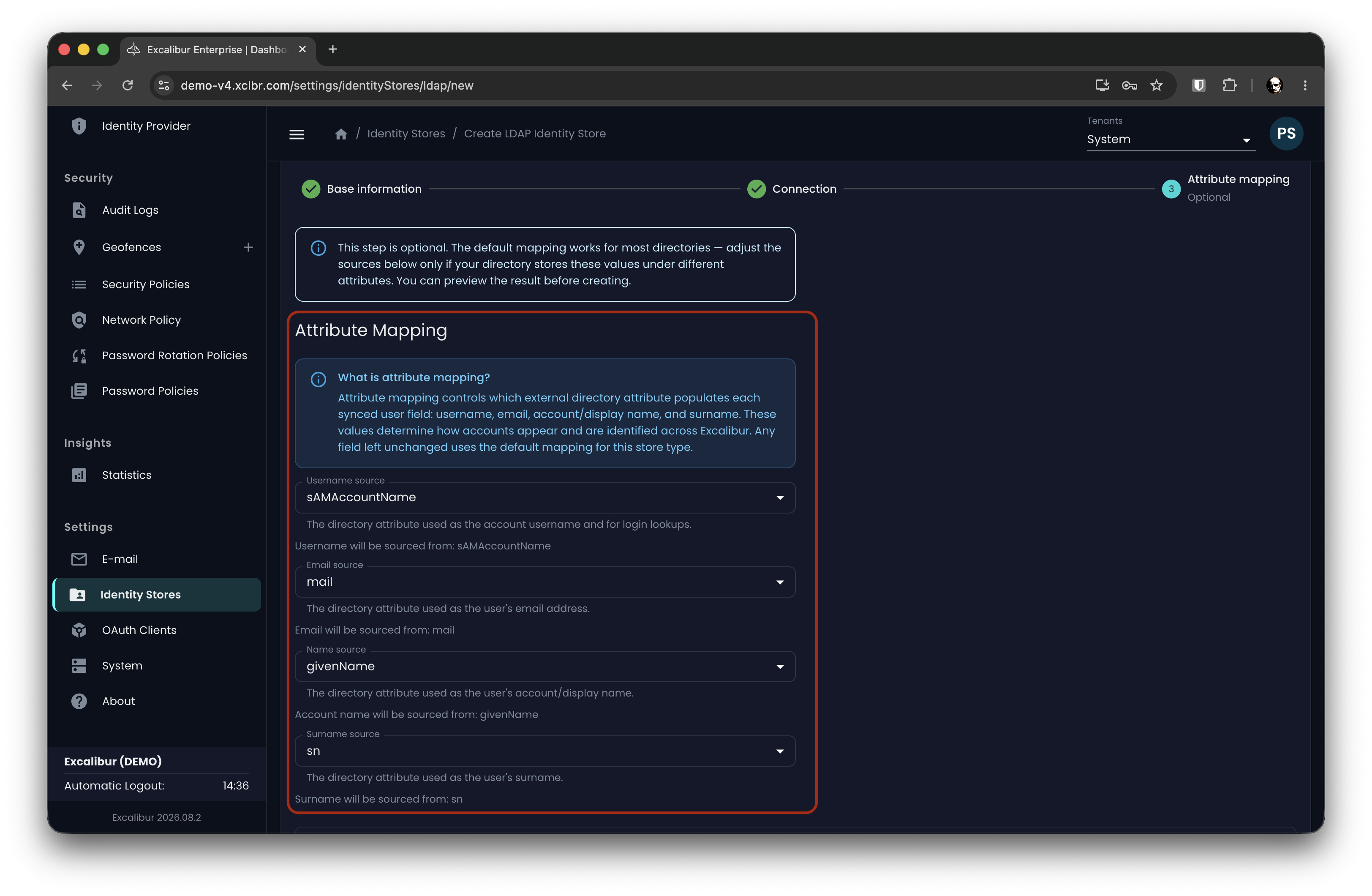
Figure 1. Setup wizard: mapping each user field to a directory attribute
Before you save, a preview resolves a sample of your users through the mapping, so you can confirm the result and review any duplicate usernames first.
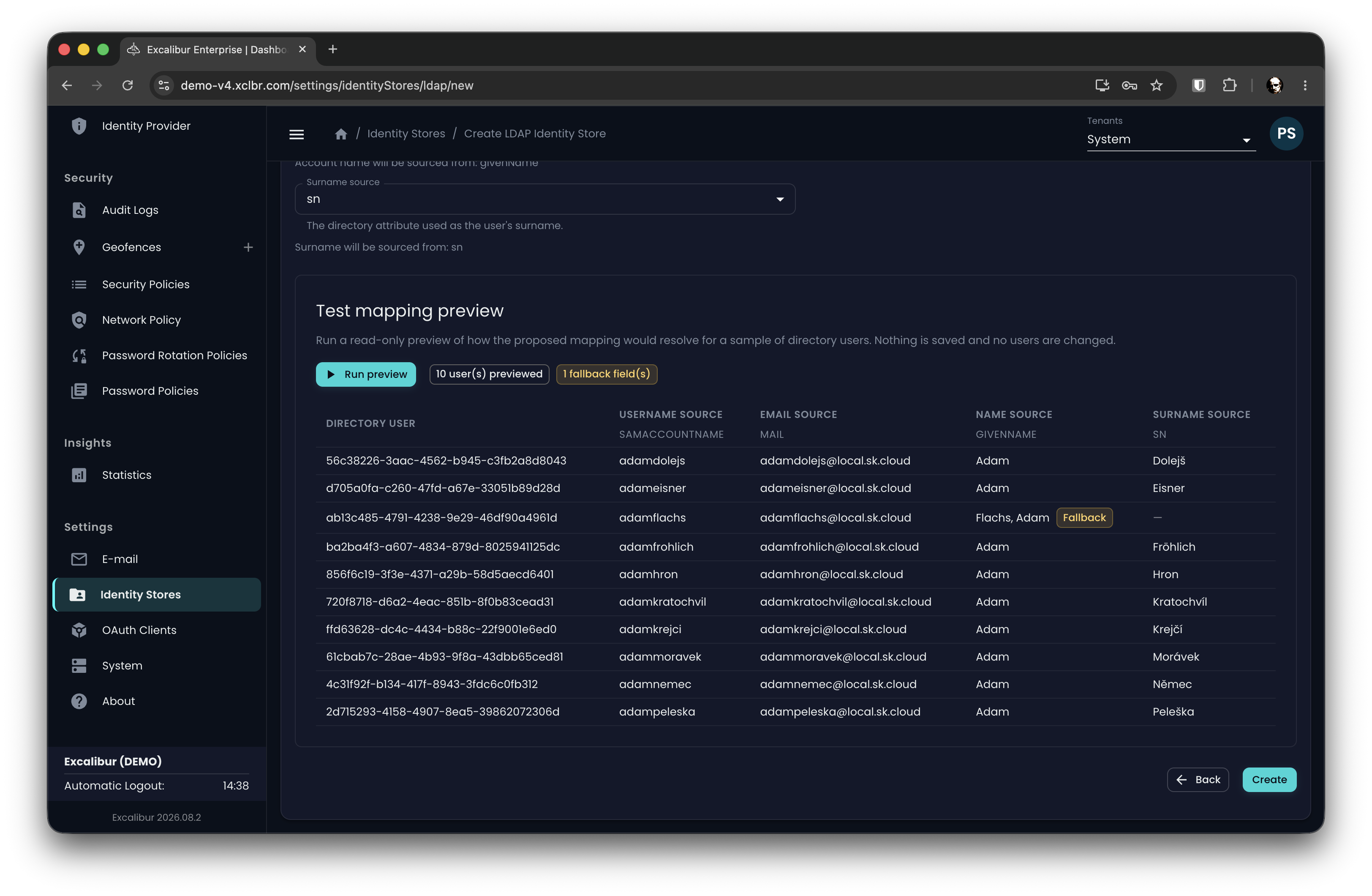
Figure 2. Preview: how users resolve before you save
After setup, the active mapping is available on the identity store detail page.
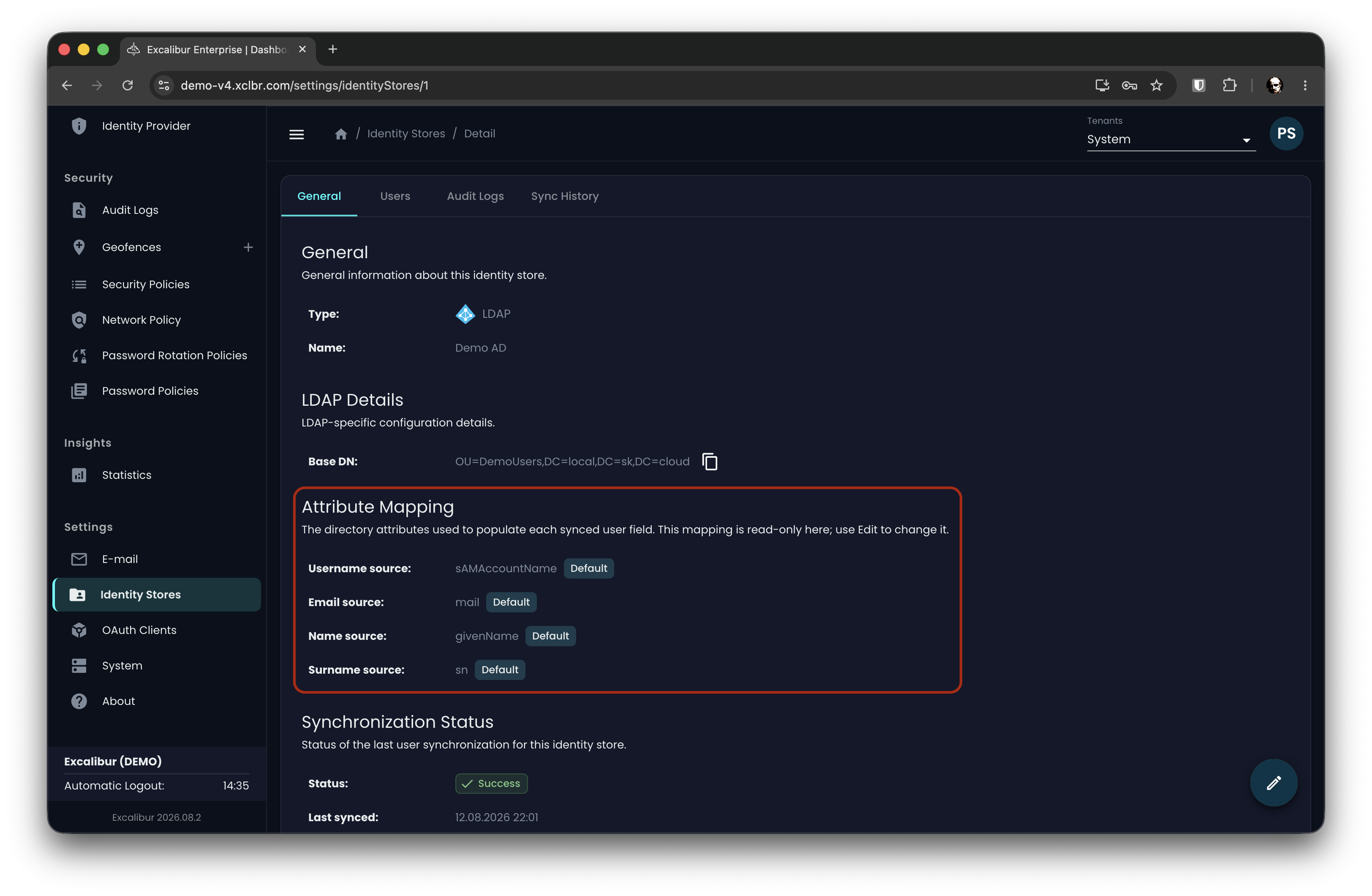
Figure 3. The active mapping on the identity store detail page
Identity store synchronization visibility
When a directory sync failed, there was no indication in the dashboard beyond an empty user list, and there was no way to run a sync on demand.
This release makes synchronization observable and gives you manual control over it.
The identity store detail page now includes a synchronization history. Each run shows its status, what triggered it, how long it took, and how many users it affected, with a drill-down to the users involved.
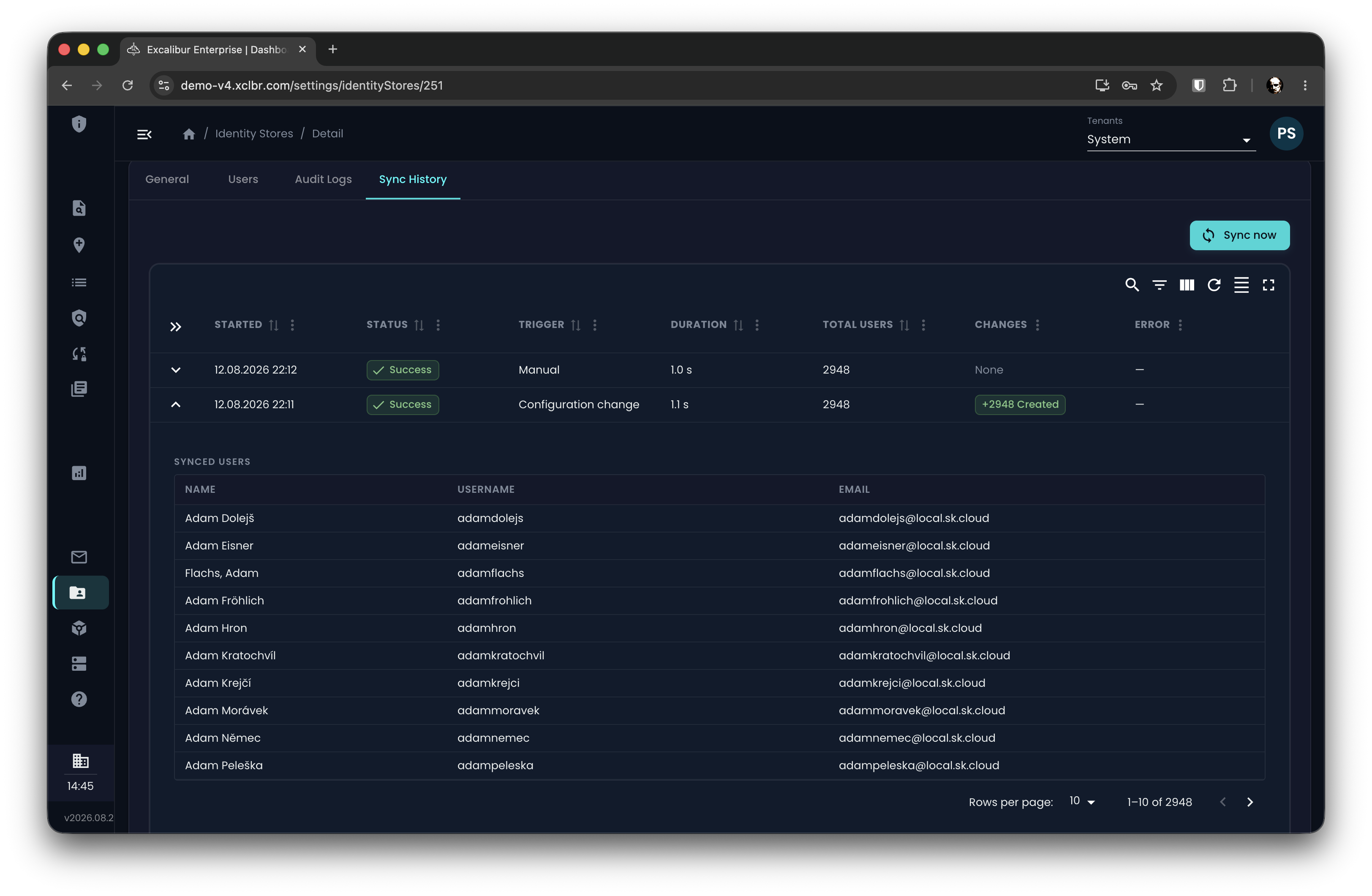
Figure 4. Synchronization history for an identity store
For EntraID stores, the setup form now lists the exact Microsoft Graph permissions the integration requires, along with admin-consent guidance.
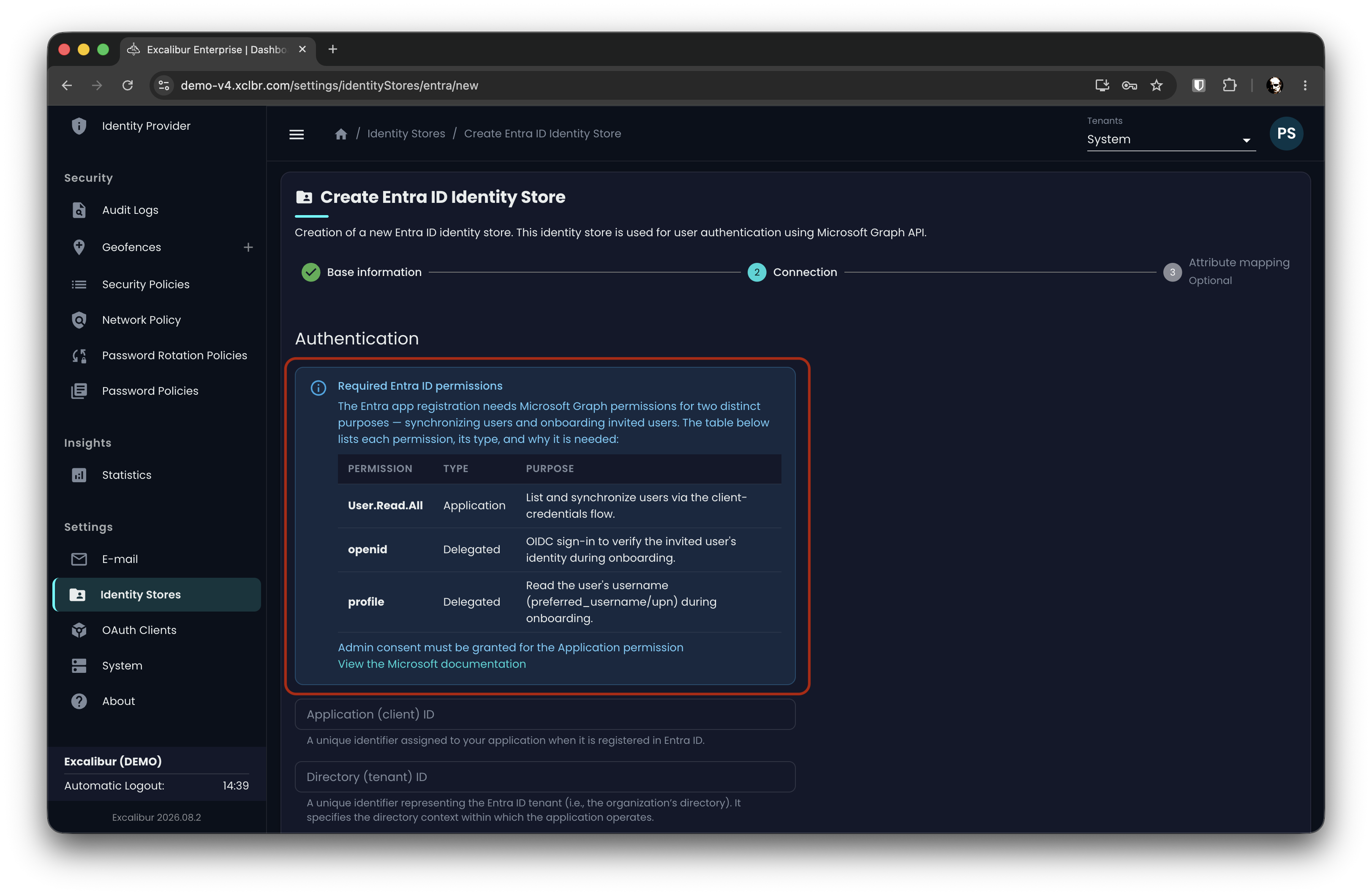
Figure 5. Required Microsoft Graph permissions for EntraID
Tunnel client version awareness
Excalibur now tracks the version of each connected tunnel client and helps you keep them current. Previously the platform recorded only a raw version string, with no way to tell whether a client was up to date or to act on it.
The tunnel list shows each client's version and a compatibility status, so you can see the state of every tunnel at a glance.
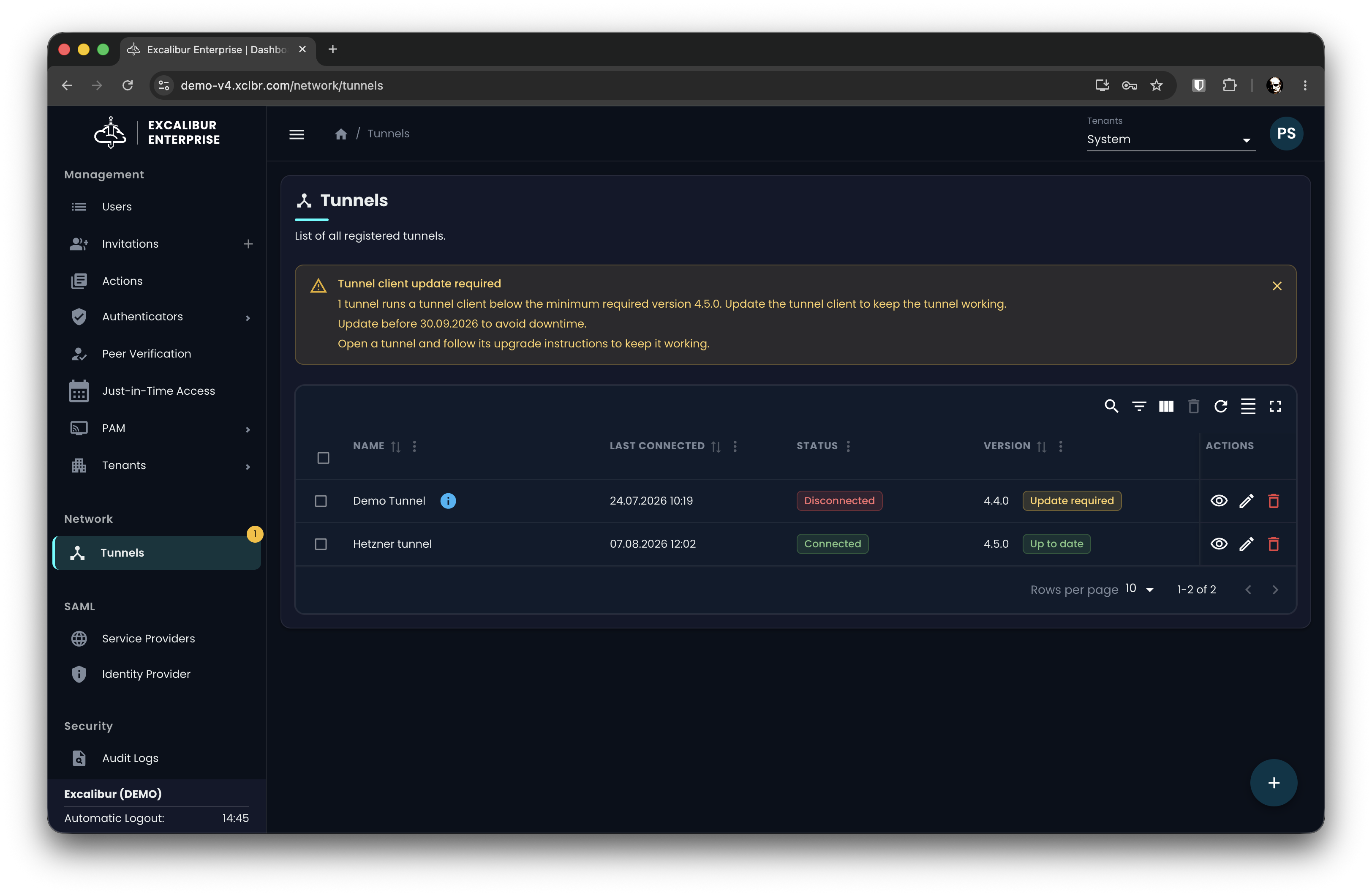
Figure 6. Tunnel list with client version and status
The tunnel detail page adds a diagnostics panel with the client's reported hostname, operating system, architecture, and observed source address.
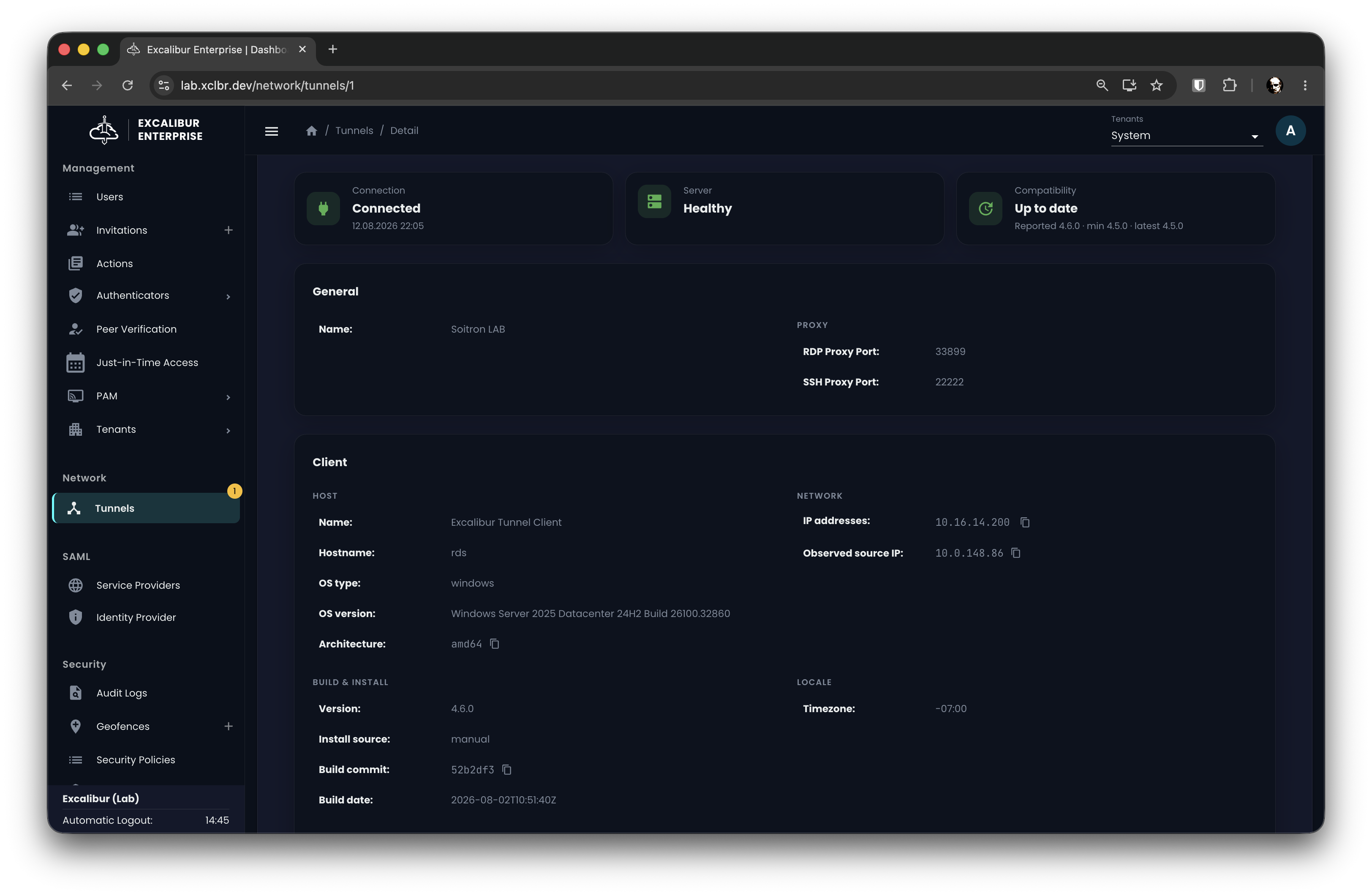
Figure 7. Tunnel detail page with client diagnostics
When a client falls below the supported minimum version, the dashboard raises an update-required warning and shows a sidebar indicator so it is visible at a glance. The client keeps working through a grace period, and the warning states the date after which it will stop connecting, so you can plan the update rather than lose connectivity.
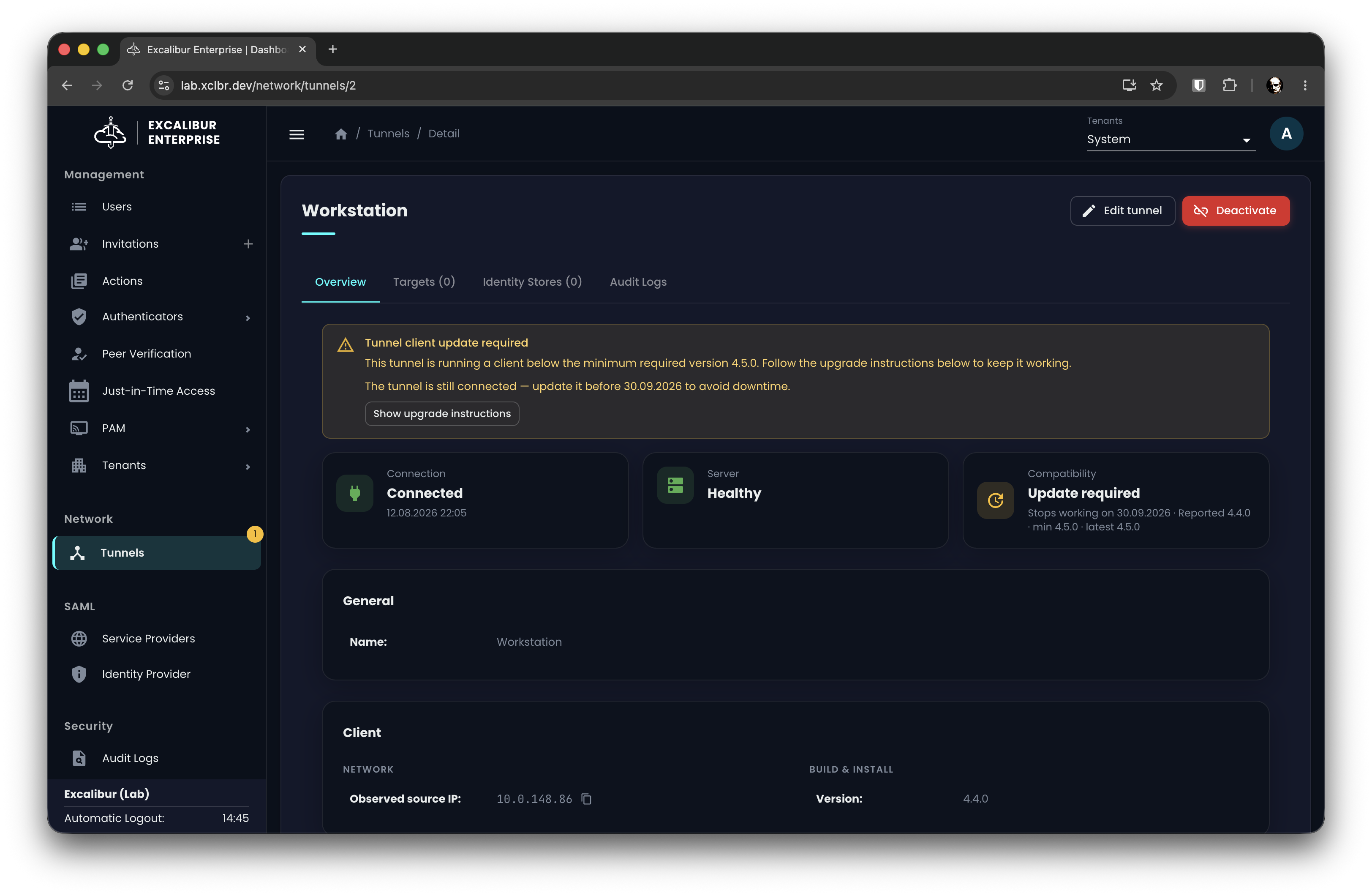
Figure 8. Update-required warning with its grace deadline
Improvements
Clearer invitations management
The invitations page previously showed only active invitations, and accepted, expired, or dismissed invitations could not be reviewed. Expiry depended on a stored value that was not always current.
The page now separates invitations into two tabs, calculates expiry in real time, and distinguishes who sent each invitation. Registration also rejects invitations that have already expired.
The Active tab opens by default and shows invitations still in play. Expiry appears as a relative time, and the invited-by column distinguishes system-generated invitations, deleted users, and real users.
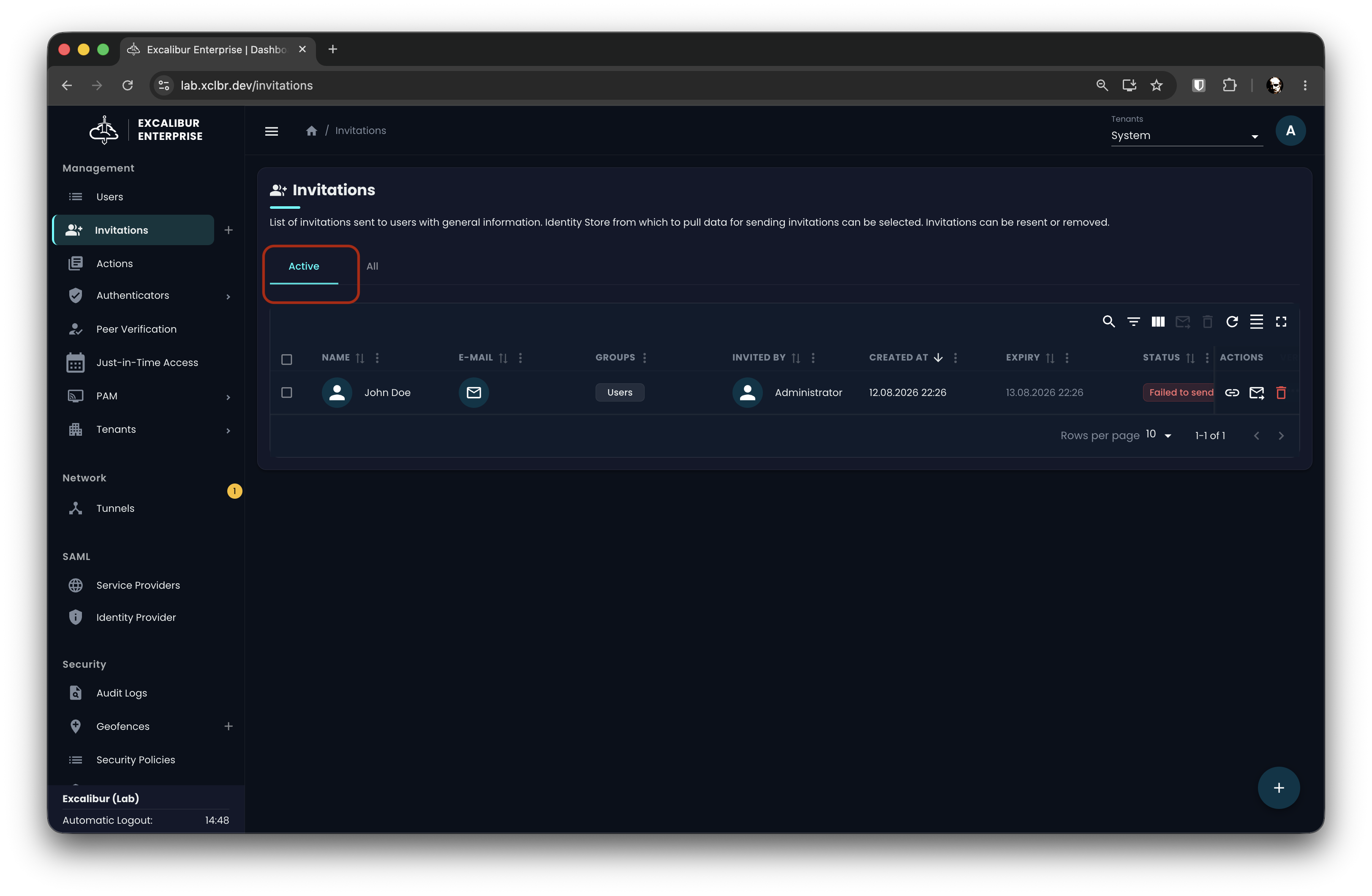
Figure 9. Invitations: the Active tab
The All tab shows every invitation, including accepted, expired, and dismissed.
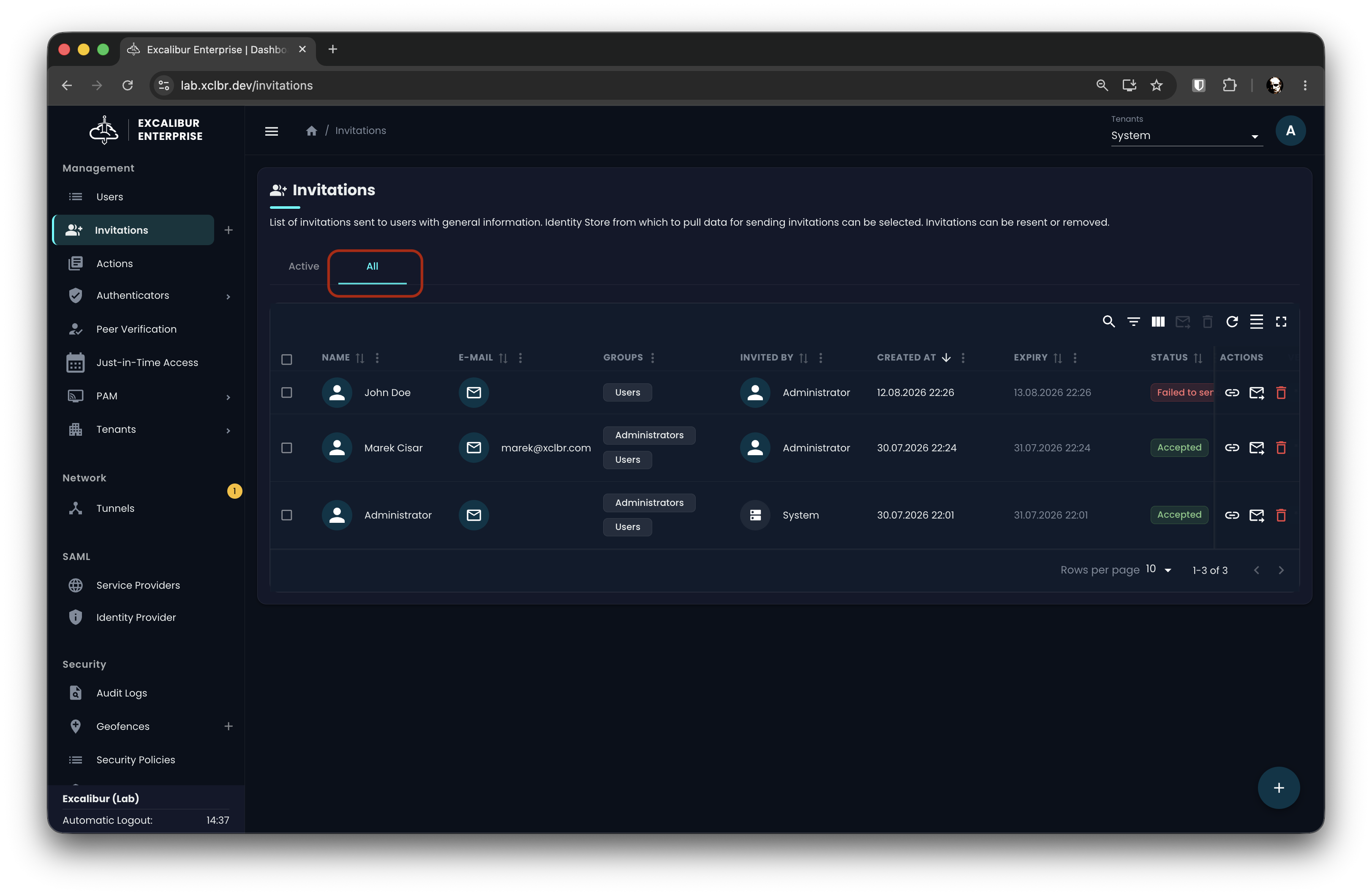
Figure 10. Invitations: the All tab with full history
Identity store picker on the Add Invitations page
The identity store picker on the Add Invitations page was placed among the table's toolbar controls and was easy to overlook. It now sits in a labeled section above the user table, so the store you are inviting from is clear before you select users.
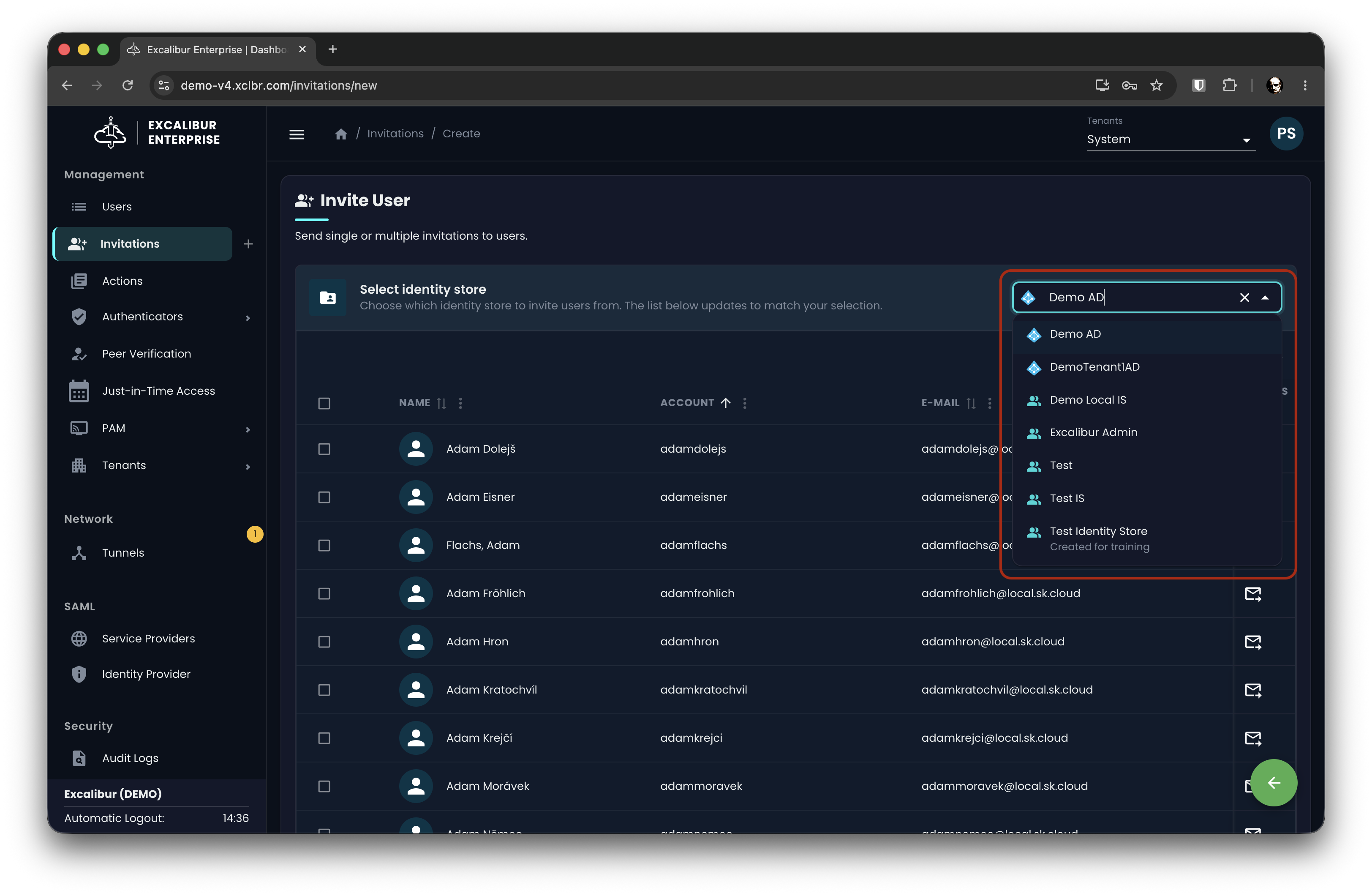
Figure 11. The identity store picker above the user table
More resilient tunnel connectivity
Tunnel clients previously stored their connection details at activation time. If the underlying infrastructure changed, for example a load balancer was recreated or a namespace changed, already-activated clients lost connectivity until they were re-activated. Clients now retrieve their connection details on demand and reconnect after such changes without re-activation. See Configuration Changes for the client update this requires.
Fixes
Session recording playback
Recorded RDP and VNC sessions could fail to open
Selecting a recording and pressing play showed a "Failed to load recording" error and nothing rendered, while live sessions were unaffected.
This is resolved, and recordings that were previously unplayable now open, with no loss of recorded data.
The mouse cursor was missing during playback
When replaying RDP and VNC recordings, the operator's mouse cursor was not shown, so a reviewer could see the screen change but not follow where the operator clicked.
The cursor is now captured and shown during playback. This applies to newly created recordings.
Seeking in long recordings showed a false timeout
Seeking far into a long recording could display a full-screen "Operation timed out" message after a few seconds and block interaction, even though playback still worked underneath.
The artificial timeout has been removed, so seeking within long recordings completes normally.
EntraID onboarding
Registration could fail with an "Invalid URL" error
Registering a user through EntraID could fail with an "Invalid URL" error and a server error, which blocked EntraID registration on deployments that use a bare hostname.
Excalibur now normalizes the hostname, and registration completes as expected.
Inviting users returned an empty list
Inviting EntraID users in a secondary (non-system) tenant could return an empty user list with no explanation, which happened when the required Microsoft Graph permission was missing.
Creating the identity store now fails immediately with a clear message that names the missing permission, so you can grant it instead of seeing an empty list.
Tunnel connectivity
Tunnel activation failed on AWS and EKS
Activating a tunnel could fail with a server error on AWS and EKS, where the load balancer is published under a hostname rather than an IP address.
Excalibur now resolves the hostname as well, and activation works on these platforms. Azure and AKS deployments are unaffected.
Self-hosted reliability
Database proxy restarted repeatedly before setup
On self-managed Kubernetes deployments, the database proxy could restart continuously before the setup wizard was completed, because it required a hostname that is not yet available at that stage. It also raised a false replica-mismatch alert during that window.
The proxy now starts immediately and provisions its certificate in the background, so it stays healthy before setup and adopts hostname changes without a restart.
About page showed the wrong PAM Orchestrator version
The About page reported the PAM Orchestrator version as "development" instead of its release version.
It now shows the correct version.
Security and Maintenance
This release includes ongoing security hardening and updates to third-party components, along with behind-the-scenes improvements to logging, reliability, and our release process. These strengthen the product without changing how you use it day to day.
For full configuration guidance, see the Installation and Implementation Guide.