Translation-authorisation rules
A translation rule answers exactly one question:
May this principal substitute this placeholder when calling this provider at this route, as this artifact type?
Identity (who is asking) is not enough on its own. Translation rules are the layer that turns identity into authority.
Warning
Default is deny. When no rule matches a request, the proxy refuses the substitution. This applies to every principal kind — there is no "default allow" mode, no implicit grant for an authenticated workload.
Where in the UI
Policy → Translation Auth.
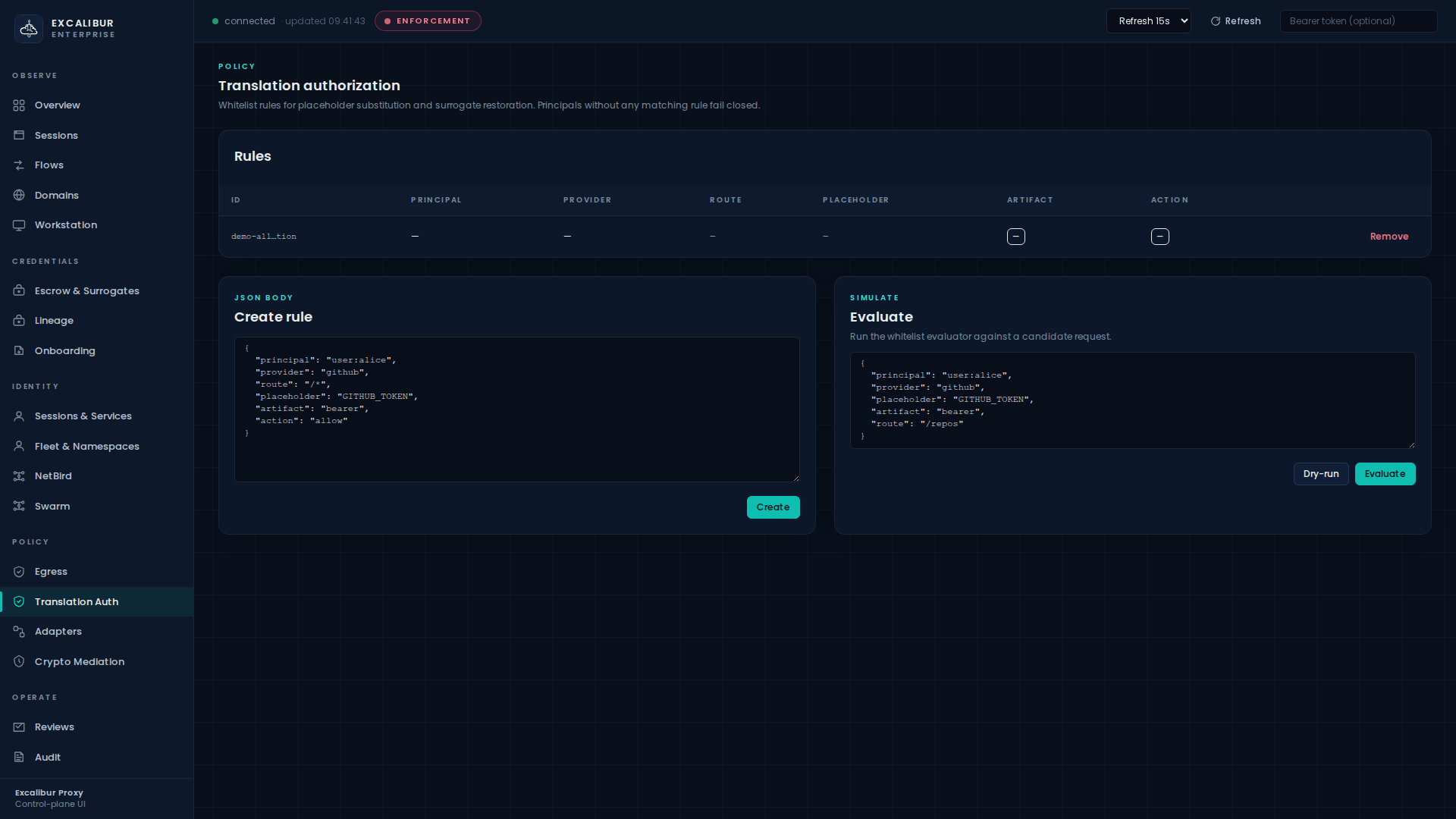
The page has three regions:
| Region | What it does |
|---|---|
| Rules | Inventory: ID, Principal, Provider, Route, Placeholder, Artifact, Action, Remove |
| Create rule | Raw JSON editor + Create button |
| Evaluate | Paste a candidate request as JSON, click Dry-run or Evaluate to see which rule matches and what action it produced |
Rule listing and evaluate/dry-run are operator-level actions. Creating and deleting rules is admin-only.
Anatomy of a rule
A rule is a JSON object. Every field except action and id is
optional. Omitted fields mean "match any value of this dimension."
{
  "id":                    "payments-stripe-prod",
  "description":           "Payments service may redeem the live Stripe key",
  "principal_kind":        "workload",
  "principal_id":          "wkl-89e881e9706d38fc",
  "namespace":             "prod/payments",
  "providers":             ["stripe"],
  "route_families":        ["stripe"],
  "operations":            ["placeholder_substitution"],
  "method":                "POST",
  "path_prefix":           "/v1/charges",
  "allowed_placeholders":  ["XCALIBUR_STRIPE_SECRET_KEY"],
  "artifact_types":        ["bearer_token"],
  "action":                "allow",
  "enabled":               true
}
Match dimensions
| Field | Meaning |
|---|---|
principal_kind |
user_session · service · workload · developer_device |
principal_id |
Exact principal ID (most-specific match) |
namespace |
Hierarchical namespace; matches the principal's namespace exactly |
providers |
Provider IDs (github, stripe, aws, bank, …) |
route_families |
Route family tag (usually equal to provider ID) |
operations |
placeholder_substitution · surrogate_restoration · adapter_restore |
method |
HTTP method |
path_prefix |
URL path prefix |
allowed_placeholders |
Names the rule scopes itself to (omit = any) |
artifact_types |
bearer_token, refresh_token, cookie, api_key, … |
action |
allow · deny |
Determinism
When multiple rules match, candidates are sorted by rule ID (lexicographic ascending) and the first match wins. Audit logs always quote the rule ID that produced the decision, so two identical requests will always cite the same rule.
Walkthrough — author & dry-run a rule
This five-step walkthrough creates a rule, validates it with a dry-run, and verifies it against a real request.
1. Draft the rule
In the Create rule card, paste:
{
  "id":                   "github-app-prod",
  "principal_kind":       "workload",
  "providers":            ["github"],
  "route_families":       ["github"],
  "operations":           ["placeholder_substitution"],
  "allowed_placeholders": ["XCALIBUR_GITHUB_TOKEN"],
  "artifact_types":       ["bearer_token"],
  "action":               "allow"
}
2. Dry-run it before saving
In the Evaluate card, paste a candidate request:
{
  "principal_kind":  "workload",
  "principal_id":    "wkl-89e881e9706d38fc",
  "provider":        "github",
  "placeholder":     "XCALIBUR_GITHUB_TOKEN",
  "artifact":        "bearer_token",
  "route":           "/repos"
}
Click Dry-run. The result panel shows whether any rule matches, which rule ID, and the resulting action — without writing anything to the live policy.
3. Create
Click Create in the Create-rule card. The rule appears
immediately in the Rules table. The next request that matches it
will be allowed; the audit event will quote
rule_id=github-app-prod.
4. Verify against a real request
From the workload:
curl -H "Authorization: Bearer XCALIBUR_GITHUB_TOKEN" \
     https://api.github.com/repos/acme/excalibur-demo/pulls
On Audit, search for type=translation_allowed and you will
see the event quoting your rule ID. Search for
type=translation_denied to confirm there are no unintended
denies.
5. Or do all of this from the CLI
# Create
curl -X POST http://localhost:8443/api/policy/translation \
  -H "Content-Type: application/json" \
  -d @rule.json

# List
curl http://localhost:8443/api/policy/translation | jq

# Dry-run
curl -X POST http://localhost:8443/api/policy/translation/dry-run \
  -H "Content-Type: application/json" \
  -d @candidate.json

# Evaluate (records the decision)
curl -X POST http://localhost:8443/api/policy/translation/evaluate \
  -H "Content-Type: application/json" \
  -d @candidate.json

# Delete
curl -X DELETE http://localhost:8443/api/policy/translation/github-app-prod
Common patterns
These patterns cover the most frequent rule shapes in production.
Per-principal (most common in production)
{
  "id":             "payments-svc-stripe",
  "principal_kind": "workload",
  "principal_id":   "wkl-89e881e9706d38fc",
  "providers":      ["stripe"],
  "operations":     ["placeholder_substitution"],
  "action":         "allow"
}
Only wkl-89e881e9706d38fc may substitute Stripe placeholders.
Everyone else is denied.
Per-namespace
{
  "id":             "ns-prod-payments",
  "principal_kind": "workload",
  "namespace":      "prod/payments",
  "providers":      ["stripe","bank"],
  "operations":     ["placeholder_substitution"],
  "action":         "allow"
}
Any workload in prod/payments may redeem Stripe and bank
placeholders. Combine with a namespace egress
policy to also restrict where they call out
to.
Per-route narrowing
{
  "id":             "github-readonly",
  "principal_kind": "workload",
  "principal_id":   "wkl-readonly-bot",
  "providers":      ["github"],
  "method":         "GET",
  "path_prefix":    "/repos",
  "operations":     ["placeholder_substitution"],
  "action":         "allow"
}
Allowed: GET /repos/.... Denied: any POST to /repos/...,
any path outside /repos. Useful when the same identity needs to
read GitHub but not push.
Explicit deny for emergencies
{
  "id":             "z-zz-quarantine-suspect",
  "principal_kind": "workload",
  "principal_id":   "wkl-suspect",
  "action":         "deny"
}
The z-zz- prefix sorts last, so it only fires if no earlier rule
matched. Useful as a "cancel everything" override after an
incident, before you finish revoking the underlying credentials.
What gets recorded
Every translation decision writes one event:
translation_allowedwithrule_id,principal,provider,placeholder,artifact.translation_deniedwith the same fields plusreason(no_matching_rule·explicit_deny·principal_unresolvable· …).
Both event types are visible on the Audit page. Filter with
type=translation_* to scope to authorisation events.
Failure modes & how to read them
reason |
Meaning |
|---|---|
no_matching_rule |
Default-deny fired — write a rule. |
principal_unresolvable |
The caller has no usable identity (e.g. missing Proxy-Authorization). |
explicit_deny |
A rule with "action":"deny" matched. |
placeholder_not_in_allowed |
The rule matched the principal/provider but excluded this placeholder. |
artifact_type_not_in_allowed |
Same as above for artifact types. |
Related
- Onboarding a workload — defines the principal that translation rules match against.
- Onboarding a credential — defines the placeholders that translation rules grant.
- Namespace egress policy — translation authorises what to substitute; egress policy authorises where to send it.